| |
|
|
||||||||||||||||||||||||||||||||||||||||||||||||||||||||||||||||||||||||||||||||||||||
 |
 |
 |
|||
|
 |
||||
 |
 |
 |
|||
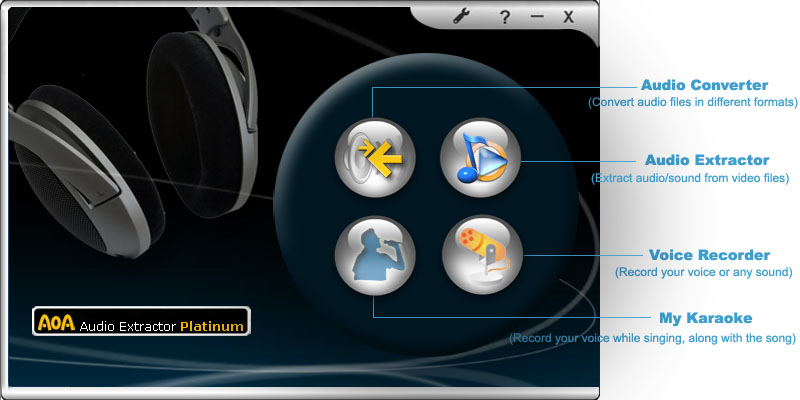
AoA Audio Extractor offers no audio silver bullet--it simply collects a set of competent audio tools in one easy-to-use format, with a few fun extras that set it apart from the crowd. http://download.cnet.com/AoA-Audio-Extractor-Platinum/3000-2140_4-10922003.html?tag=mncol;1 |
This audio extractor freeware has perfect pitch. AoA Audio Extractor's interface smartly resembles a media player. Simply add video files through a traditional browse dialog box. Choosing an output option is as easy as pressing a radio button. The output is limited to the big three in audio: MP3, WAV, and AC3. Bit rates, sample rate, and channels are easily selected from handy pull-down menus. We like that you can choose your favorite settings once, and then forget about them. Extraction is easy (just hit the Start button), and file conversion is nearly instantaneous. You won't find all kinds of bells and whistles on this software, and they're not needed. Novices will appreciate how easy it is to use, and advanced users will love how quickly it converts. If you have a need to extract the audio from a video file, this freeware will be a smash hit. http://download.cnet.com/AoA-Audio-Extractor/3000-2170_4-10605079.html?tag=mncol;1#rateit |
| Why buy AoA Audio Extractor Platinum when the basic version is free? | ||
| Extract audio tracks from video files |  |
|
| Save any portion of the audio of a video file | |
|
| Convert audio files between different formats | |
- |
| Sound Recording (Capture Audio) | |
- |
| Voice Changer | |
- |
| Karaoke Song Recording | |
- |
| Audio Formats Supported | MP3, WAV, AC3 iPhone Ringtone, WMA |
MP3, WAV, AC3 |
| Video Formats Supported - AVI, MPEG, MPG, FLV (Flash Video), Youtube, DAT, WMV, MOV, MP4, 3GP | |
|
Batch conversion |
Unlimited |
3 files maximum at a time |
| Get Audio Extractor Platinum and enjoy the full version immediately! |  |
 |
 |
||
| Thank you I downloaded your AoA Audio Extractor today and found it to be a most useful program. I used it to extract an audio file from an wrongly dubbed avi file and then managed to use the mp3 audio file to resynchronise the avi file (using some of my Windows software) and now the actors lips and speech match up! Many thanks for making this available as a free download. Thank you Thanks a lot about AoA Audio Extractor! It's very important and helpful for my videos. It's amazing tools. Thanks again. Works well and for free! Support the various formats I use: MPEG/MP4 to MP3/WAV. Allow for low-to-high quality (bitrate, sample rate, etc.) Fast enought. Nice and intuitive interface. Excellent This is a very useful small tool with which you can extract the music/audio and other sound from your saved video files without any distortion.The out-put mp3 file will be kept in your specified folder and play with any of your player or this has a player mode also. Just browse and show the folder where you want to keep the output file , then, add the video-file from your disk or that saved from a cd and cick'Start'.That's all ; within minutes you will get the output...Really great. Very handy Easy to use. Does what it says and free. there's tons of pay software for this sort of thing and this one free and works great! Simple & GREAT Very easy to use and fast. It converted a 1.5 hr. concert to mp3 (320 kbps) in about 5 min. It offers a choice of audio bitrates and type. Original is not harmed. This is a perfect program. Top of the line Fast, configurable, accurate, and inexpensive. I've only tried two of these rippers, Acala and AoA, and I prefer the AoA by far. I won't need to try any others since this one does a great job. Fast and Easy I can't believe how fast and simple this was. It was as easy as selecting the files and hitting the "Start" button. I saved 1.5G space on my MP3 player Does what it says Hey it does what it says. I had a paid extractor, but this one is way more better and cool than that. I highly recommend this one. Works as advertized Works great, and it's free. I downloaded AOA Audio extractor to try it and I find it to be a very fine product. Thank you for putting such a fine product as freeware for internet users to enjoy. Great program. Easy to use, does exactly what I want it to do. This is great. I have been looking for something like this for awhile. Simple to use, nice look. As an audiophile I love the options this thing gives me. Now have the choice to just listen on my ipod to those music dvds. save on battery and file size. Well done, great stuff. |
© 2004-2017 AoAMedia.Com |