 |
Advanced X Video Converter is a comprehensive video conversion software that makes it easy to convert, join and split video files. It supports almost all popular video formats, e.g. AVI (DivX, XviD...), MPEG, MOV (QuickTime), WMV, Zune, Flash Vieo (FLV), MP4, iPod, iPad, iPhone, Android Mobile, 3GP (Cell Phone), PSP and M4V. It converts videos to PowerPoint friendly format as well. |
More Features. More Fun!
Extract Movie Clip
Advanced X Video Converter makes it so simple to extract and convert your favorite clip from a video. Video to Picture
You can easily extract pictures from a video, or convert videos to JPG/PNG with Advanced X Video Converter. Disable Audio
You may need to remove sound track from video. Advanced X Video Converter allows you to strip audio with a few clicks!
In this guide we will explain how to split video files (extract movie clip). You are able to read more guides about the other uses of the program through the right menu.
|
Guide - Video Splitter, Split AVI MPEG WMV DAT MOV 3GP MP4 FLV |
Step 1:
Obtain and install Advanced X Video Converter. |

|
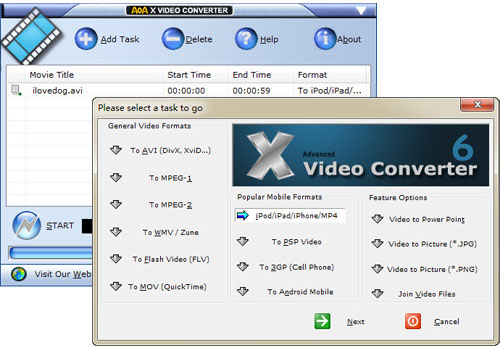
| Step 1: Launch Advanced X Video Converter and then click the "Add Task" button on the main window.
Step 2 :
Select an output format, which could be the same with the original video.
|
 |
| Stpe 3:
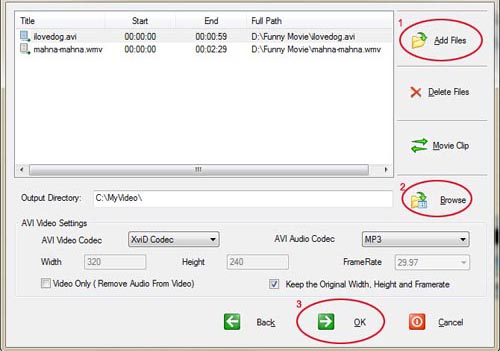
Click the "Add Files" button to add source files you wish to convert to MPEG format.
Click the "Browse" button to select the location where you want the output file to be saved.
Click "Movie Clip". |
 |
Step 4:
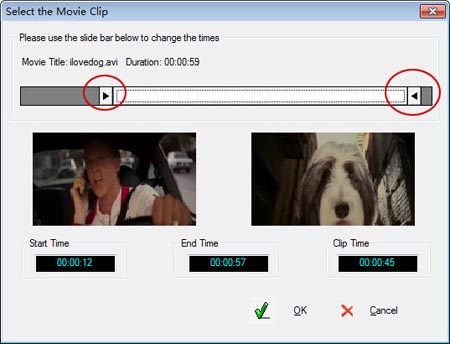
Select the Start Time and the End Time by moving the slider bar.
Click OK.
|
 |
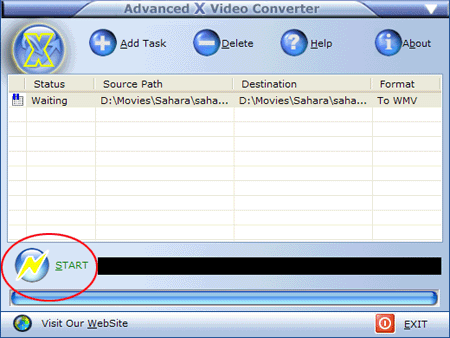
Step 4: Click the "Start" button.
This should be the picture you'll get after you have added the task. You can add as many as you want and have then processed all together. Simply click the "Start" button to start conversion. |
 |
Advanced X Video Converter is a very good program. Its speed is above the average and generally it's a handy tool for all these video conversions you want to do fast and easy.
|
|
|
| It's strongly recommended to use AOA DVD RIPPER, which aims to convert DVDs/VOB to AVI/MPEG/WMV/MP4/3GP/WAV format and outputs smaller size video with better quality. |
Testimonials |
Joseph Holton, US
Easy to use and supports many file types, I find it to be a fast easy to use video conversion tool which not only supports most video file types,but has all the options the advanced user could want as well.
Steve Pestell, UK
I need to convert 3Ds AVI files to mpgs for students DVDs. Your video converter seems fantastic to work with.
Darrick N, Denmark
Perfect! It did just what it said it would. With a simple user interface that required NO learning process! All the different options for converting video, a friend of mine recommended the program.
Thomas G, US
I created my blog and I want to use video file on my blog. Great evaluation program that did exactly what it said on the tin.
More... |
|
|